tespy.components.piping package
tespy.components.piping.pipe module
Module of class Pipe.
This file is part of project TESPy (github.com/oemof/tespy). It’s copyrighted by the contributors recorded in the version control history of the file, available from its original location tespy/components/piping/pipe.py
SPDX-License-Identifier: MIT
- class tespy.components.piping.pipe.Pipe(label, **kwargs)[source]
Bases:
SimpleHeatExchangerThe Pipe is a subclass of a SimpleHeatExchanger.
There are two different types of pipes available: An at the surface and a subsurface buried pipe. The implementation is based on [38] (surface) and [39] (subsurface).
Mandatory Equations
fluid:
tespy.components.component.Component.variable_equality_structure_matrix()mass flow:
tespy.components.component.Component.variable_equality_structure_matrix()
Optional Equations
tespy.components.heat_exchangers.simple.SimpleHeatExchanger.energy_balance_func()tespy.components.heat_exchangers.simple.SimpleHeatExchanger.darcy_func()tespy.components.heat_exchangers.simple.SimpleHeatExchanger.hazen_williams_func()tespy.components.heat_exchangers.simple.SimpleHeatExchanger.kA_group_func()tespy.components.heat_exchangers.simple.SimpleHeatExchanger.kA_char_group_func()tespy.components.piping.pipe.Pipe.ohc_subsurface_group_func()
Inlets/Outlets
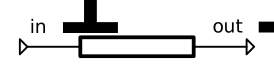
in1
out1
Optional inlets/outlets
heat
Image

- Parameters:
label (str) – The label of the component.
design (list) – List containing design parameters (stated as String).
offdesign (list) – List containing offdesign parameters (stated as String).
design_path (str) – Path to the components design case.
local_offdesign (boolean) – Treat this component in offdesign mode in a design calculation.
local_design (boolean) – Treat this component in design mode in an offdesign calculation.
char_warnings (boolean) – Ignore warnings on default characteristics usage for this component.
printout (boolean) – Include this component in the network’s results printout.
Q (float, dict) – Heat transfer, \(Q/\text{W}\).
pr (float, dict) – Outlet to inlet pressure ratio, \(pr/1\).
zeta (float, dict) – Geometry independent friction coefficient, \(\frac{\zeta}{D^4}/\frac{1}{\text{m}^4}\).
flow_speed (float, dict) – Flow speed at the inlet of the pumpe, \(c/\text{m/s}\)
D (float, dict,
"var") – Diameter of the pipes, \(D/\text{m}\).L (float, dict,
"var") – Length of the pipes, \(L/\text{m}\).ks (float, dict,
"var") – Pipe’s roughness, \(ks/\text{m}\).darcy_group (str, dict) – Parametergroup for pressure drop calculation based on pipes dimensions using darcy weissbach equation.
ks_HW (float, dict,
"var") – Pipe’s roughness, \(ks/\text{1}\).hw_group (str, dict) – Parametergroup for pressure drop calculation based on pipes dimensions using hazen williams equation.
kA (float, dict,
"var") – Area independent heat transfer coefficient, \(kA/\frac{\text{W}}{\text{K}}\).kA_char (tespy.tools.characteristics.CharLine, dict) – Characteristic line for heat transfer coefficient.
Tamb (float, dict) – Ambient temperature, provide parameter in network’s temperature unit, \(Tamb/\text{K}\).
kA_group (str, dict) – Parametergroup for heat transfer calculation from ambient temperature and area independent heat transfer coefficient kA.
insulation_thickness (float) – thickness of insulation, \(insulation_thickness/\text{m}\).
insulation_tc (float) – thermal conductivity insulation, \(insulation_tc/\frac{\text{W}}{\text{m}\text{K}}\).
material (str, float) – material of pipe: “Steel”, “Carbon Steel”, “Cast Iron”, “Stainless Steel”, “PVC”, “CommercialCopper” or user-specified heat conductivity of material: float
pipe_thickness (float) – thickness of pipe, \(pipe_thickness/\text{m}\).
environment_media (str) – environment media around the pipe: “air”, “gravel”, “stones”, “dry soil”, “moist soil”.
wind_velocity (float) – Mean velocity of the wind. Needs to be greater than zero, \(wind_velocity/\frac{\text{m}}{\text{s}}\).
pipe_depth (float) – pipe depth in the ground, \(pipe_depth/\text{m}\)
Example
A mass flow of 10 kg/s hot ethanol is transported in a pipeline. The pipe is considered adiabatic, in the first approach and has a length of 100 meters. We can calculate the diameter required at a given pressure loss of 2.5 %. After we determined the required diameter, we can predict pressure loss at a different mass flow through the pipeline. Afterwards heat losses can be calculated by defining insulation and environment parameters. The heat losses of a subsurface pipe can be compared to heat losses of a surface pipe.
>>> from tespy.components import Sink, Source, Pipe
>>> from tespy.connections import Connection
>>> from tespy.networks import Network
>>> nw = Network(iterinfo=False)
>>> nw.units.set_defaults(**{
...     "pressure": "bar", "pressure_difference": "bar",
...     "temperature": "degC", "enthalpy": "kJ/kg"
... })
>>> so = Source("source 1")
>>> si = Sink("sink 1")
>>> pi = Pipe("pipeline")
>>> pi.set_attr(pr=0.975, Q=0, L=100, D="var", ks=5e-5)
>>> inc = Connection(so, "out1", pi, "in1")
>>> outg = Connection(pi, "out1", si, "in1")
>>> nw.add_conns(inc, outg)
>>> inc.set_attr(fluid={"ethanol": 1}, m=10, T=30, p=3)
>>> nw.solve("design")
>>> round(pi.D.val, 3)
0.119
>>> round(outg.p.val / inc.p.val, 3) == round(pi.pr.val, 3)
True
>>> inc.set_attr(m=15)
>>> pi.set_attr(pr=None)
>>> pi.set_attr(D=pi.D.val)
>>> nw.solve("design")
>>> round(pi.pr.val, 2)
0.94
In the second section the example shows how to calculate the heat losses of the pipe to the ambient considering insulation. For this, we will look at a pipe transporting hot water. Since we change the fluid, we should also give a reasonable guess value for the outflow connection of the pipe as the initial guess originates from the previous calculation using ethanol as fluid.
>>> inc.set_attr(fluid={"water": 1, "ethanol": 0}, T=100)
>>> outg.set_attr(h0=300)
>>> pi.set_attr(
...     D="var", Q=None, pr=0.975,
...     Tamb=0, environment_media="dry soil", pipe_depth=5,
...     insulation_thickness=0.1, insulation_tc=0.035,
...     pipe_thickness=0.003, material="Steel"
... )
>>> nw.solve("design")
>>> round(pi.Q.val, 2)
-1780.74
We can reuse many of the given parameters of the pipe. By unsetting the pipe”s depth and setting the environment media and wind velocity instead the analogous method for surface pipes is applied. Observe, how the overall heat loss increases.
>>> pi.Q_ohc_group_subsurface.is_set = False
>>> pi.set_attr(
...     pipe_depth=None, environment_media="air", wind_velocity=2.0
... )
>>> nw.solve("design")
>>> round(pi.Q.val, 2)
-2434.12
- flow_speed_func()[source]
Heat transfer calculation based on pipe material, insulation and surrounding ambient conditions for subsurface pipes.
- Returns:
float – Residual value of equation
\[0 = c \cdot \pi \cdot D ^ 2 - \dot m \cdot v_\text{in} * 4\]
- ohc_subsurface_group_func()[source]
Heat transfer calculation based on pipe material, insulation and surrounding ambient conditions for subsurface pipes.
- Returns:
float – Residual value of equation
\[0 = \dot m \cdot \left(h_\text{out}-h_\text{in}\right)- \Delta T_\text{log} \cdot A \cdot U\]First order approximation of multipole method for a single pipe in the ground.
Reference: [39]
- ohc_surface_group_func()[source]
Heat transfer calculation based on pipe material, insulation and surrounding ambient conditions fur surface pipes. Valid for forced convection.
- Returns:
float – Residual value of equation
\[ \begin{align}\begin{aligned}0 = \dot m \cdot \left(h_\text{out}-h_\text{in}\right)- \Delta T_\text{log} \cdot A \cdot U\\U = R_\text{conductance} + \frac{1}{\alpha_\text{outer}}\\\alpha_\text{outer} = \frac{Nu_\text{l} \cdot \lambda}{l}\\Nu_\text{l}= 0.3 + \sqrt{Nu_\text{l, lam}^{2} + Nu_\text{l, turb}^{2}}\\Nu_\text{l, turb} = \frac{0.037 Re_l^{0.8} \cdot Pr}{1+2.443 \cdot Re_l^{-0.1}\cdot (Pr^{2/3}-1)}\\Nu_\text{l, lam} = 0.664 \sqrt{Re_l}\cdot \sqrt[3]{Pr}\end{aligned}\end{align} \]Reference ([38])
tespy.components.piping.valve module
Module of class Valve.
This file is part of project TESPy (github.com/oemof/tespy). It’s copyrighted by the contributors recorded in the version control history of the file, available from its original location tespy/components/piping.py
SPDX-License-Identifier: MIT
- class tespy.components.piping.valve.Valve(label, **kwargs)[source]
Bases:
ComponentThe Valve throttles a fluid without changing enthalpy.
Mandatory Equations
fluid:
tespy.components.component.Component.variable_equality_structure_matrix()mass flow:
tespy.components.component.Component.variable_equality_structure_matrix()
Optional Equations
Inlets/Outlets
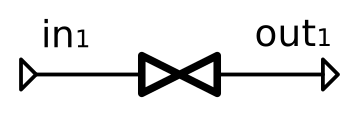
in1
out1
Image

- Parameters:
label (str) – The label of the component.
design (list) – List containing design parameters (stated as String).
offdesign (list) – List containing offdesign parameters (stated as String).
design_path (str) – Path to the components design case.
local_offdesign (boolean) – Treat this component in offdesign mode in a design calculation.
local_design (boolean) – Treat this component in design mode in an offdesign calculation.
char_warnings (boolean) – Ignore warnings on default characteristics usage for this component.
printout (boolean) – Include this component in the network’s results printout.
pr (float, dict,
"var") – Outlet to inlet pressure ratio, \(pr/1\)zeta (float, dict,
"var") – Geometry independent friction coefficient, \(\frac{\zeta}{D^4}/\frac{1}{\text{m}^4}\).dp_char (tespy.tools.characteristics.CharLine, dict) – Characteristic line for difference pressure to mass flow.
Example
A mass flow of 1 kg/s methane is throttled from 80 bar to 15 bar in a valve. The inlet temperature is at 50 °C. It is possible to determine the outlet temperature as the throttling does not change enthalpy.
>>> from tespy.components import Sink, Source, Valve
>>> from tespy.connections import Connection
>>> from tespy.networks import Network
>>> nw = Network(iterinfo=False)
>>> nw.units.set_defaults(**{
...     "pressure": "bar", "pressure_difference": "bar",
...     "temperature": "degC"
... })
>>> so = Source('source')
>>> si = Sink('sink')
>>> v = Valve('valve')
>>> so_v = Connection(so, 'out1', v, 'in1')
>>> v_si = Connection(v, 'out1', si, 'in1')
>>> nw.add_conns(so_v, v_si)
>>> v.set_attr(offdesign=['zeta'])
>>> so_v.set_attr(fluid={'CH4': 1}, m=1, T=50, p=80, design=['m'])
>>> v_si.set_attr(p=15)
>>> nw.solve('design')
>>> design_state = nw.save(as_dict=True)
>>> round(v_si.T.val, 1)
26.3
>>> round(v.pr.val, 3)
0.188
The simulation determined the area independent zeta value \(\frac{\zeta}{D^4}\). This zeta remains constant if the cross sectional area of the valve opening does not change. Using the zeta value we can determine the pressure ratio at a different feed pressure.
>>> so_v.set_attr(p=70)
>>> nw.solve('offdesign', design_path=design_state)
>>> round(so_v.m.val, 1)
0.9
>>> round(v_si.T.val, 1)
30.0
You can also specify the flow coefficient of the valve
Kvwhich is used in context of liquids. For this there are several methods available:direct specification with
Kvlookup table specification \(Kv=f\left(opening\right)\) with
Kv_charandopeningarbitrary function specification \(Kv=f\left(opening, params\right)\) with
Kv_analyticalandopening
>>> nw = Network(iterinfo=False)
>>> nw.units.set_defaults(**{
...     "pressure": "bar", "pressure_difference": "bar",
...     "temperature": "degC"
... })
>>> so = Source('source')
>>> si = Sink('sink')
>>> v = Valve('valve')
>>> so_v = Connection(so, 'out1', v, 'in1')
>>> v_si = Connection(v, 'out1', si, 'in1')
>>> nw.add_conns(so_v, v_si)
>>> so_v.set_attr(fluid={'water': 1}, T=50, p=5)
>>> v_si.set_attr(p=4)
First we specify Kv:
>>> v.set_attr(Kv=10)
>>> nw.solve('design')
>>> round(so_v.v.val, 4)
0.0028
Then, for example an analytical function:
>>> def analytical(opening, *params):
...     return params[0] * opening
>>> v.set_attr(
...     Kv=None,
...     opening=0.5,
...     Kv_analytical={"method": analytical, "params": [10]}
... )
>>> nw.solve("design")
>>> round(v.Kv.val_SI, 1)
5.0
Or, use the
Kv_char, which is aCharLineinstance:>>> from tespy.tools import CharLine >>> kv_data = np.array([ ... 0.09,0.63,1.1,2.1,3.1,4.2,5.2,6.2,7.2,8.2,9.2,10.3,11.3 ... ]) >>> opening_data = np.array([0,5,10,20,30,40,50,60,70,80,90,100,110]) / 100 >>> Kv_char = { ... "char_func": CharLine(x=opening_data, y=kv_data) , "is_set": True ... } >>> v.set_attr(Kv_char=Kv_char, Kv_analytical=None) >>> nw.solve("design") >>> round(v.Kv.val, 1) 5.2
- Kv_char_analytical_func()[source]
Equation for Kv characteristic of a Valve opening \(K_v=f\left(opening\right)\)
Kv is determined from the method supplied by the user in the
Kv_analyticalspecification and the additional parameters next to the opening. The method must accept parameters in the following way:method(opening, *params)\[K_v=\dot V \cdot \sqrt{\frac{\rho}{1000\cdot \Delta p}}\]The residual is reformulated as below:
- Returns:
float – Residual value of equation.
\[0=K_v ^ 2 \cdot \frac{\Delta p}{100} -\frac{\left(3600 \cdot \dot m \right) ^ 2}{\rho}\]
- Kv_char_func()[source]
Equation for Kv characteristic of a Valve opening \(K_v=f\left(opening\right)\)
Kv is determined from the degree of opening with a lookup table, the Kv equation is then applied:
\[K_v=\dot V \cdot \sqrt{\frac{\rho}{1000\cdot \Delta p}}\]The residual is reformulated as below:
- Returns:
float – Residual value of equation.
\[0=K_v ^ 2 \cdot \frac{\Delta p}{100} -\frac{\left(3600 \cdot \dot m \right) ^ 2}{\rho}\]
- Kv_func()[source]
Equation for Kv value of a Valve
The equation is as follows:
\[K_v=\dot V \cdot \sqrt{\frac{\rho}{1000\cdot \Delta p}}\]The residual is reformulated as below:
- Returns:
float – Residual value of equation.
\[0=K_v ^ 2 \cdot \frac{\Delta p}{100} -\frac{\left(3600 \cdot \dot m \right) ^ 2}{\rho}\]
- dp_char_func()[source]
Equation for characteristic line of difference pressure to mass flow.
- Returns:
float – Residual value of equation.
\[0=p_\text{in}-p_\text{out}-f\left( expr \right)\]
- entropy_balance()[source]
Calculate entropy balance of a valve.
Note
The entropy balance makes the following parameter available:
\[\begin{split}\text{S\_irr}=\dot{m} \cdot \left(s_\text{out}-s_\text{in} \right)\\\end{split}\]
- get_plotting_data()[source]
Generate a dictionary containing FluProDia plotting information.
- Returns:
data (dict) – A nested dictionary containing the keywords required by the
calc_individual_isolinemethod of theFluidPropertyDiagramclass. First level keys are the connection index (‘in1’ -> ‘out1’, therefore1etc.).