Exergy Analysis of a Ground-Coupled Heat Pump
Note
The exergy analysis in this tutorial uses exerpy, the dedicated external library for exergy analysis. Exerpy is fully compatible with TESPy models - build your network as usual and pass the system boundary crossing streams to exerpy for automatic analysis. On top of physical exergy, exerpy offers advanced features like exergoeconomic methods. More examples are available in the exerpy documentation.
Task
This tutorial shows how to set up and carry out an exergy analysis for a
ground-coupled heat pump (GCHP). In addition, various post-processing options
are presented. To investigate the impact of refrigerant choice on COP and
exergetic efficiency, the same HeatPumpModel class is evaluated with
different refrigerants (NH3 and R290). Finally, the influence of varying
different parameters on COP and exergy efficiency is investigated and plotted.
Note
Please note, currently this tutorial is intended to show the user, how to carry out an exergy analysis for a simple system and how to use this toolbox in several investigations of a specific system. While there is a very short description of the setup, methodology and results, an in-depth discussion of the method and the results is not yet provided. If you would like to add this to the documentation you are welcome to contact us via our GitHub.
Since there is an existing tutorial for creating a heat pump, this tutorial starts with the explanations for setting up the exergy analysis. Note however, that the heat pump model differs slightly in structure from the model in the previous tutorial. All related Python scripts of the fully working GCHP-model are listed in the following:
GCHP model class:
heat_pump_model.pySingle-fluid evaluation (NH3):
NH3_example.pyFull calculations for all refrigerants with parametric studies:
all_calculations.pyPlots of the results of the parameter variations:
plots.py
The figure below shows the topology of the GCHP. In this model, a ground-coupled heat pump is modeled, which is for instance connected to a single-family house with underfloor heating. The heating system represents the heat demand of the house. The geothermal heat collector is represented by a ground heat feed flow (Source) and return flow (Sink). The heat pump circuit consists of the basic components: condenser, expansion valve, evaporator and compressor.
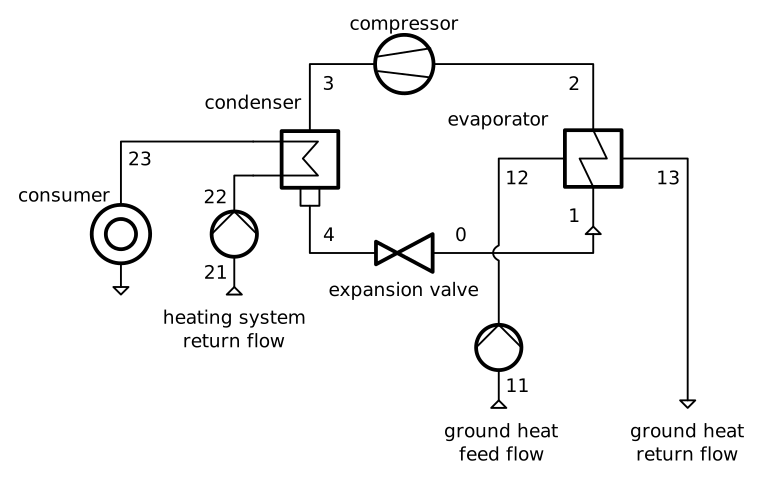
Figure: Topology of the Ground-Couped Heat Pump (GCHP).

Figure: Topology of the Ground-Couped Heat Pump (GCHP).
The input data of the model are based on different literature. In general, the model of the GCHP is based on a data sheet of a real heat pump (Viessmann Vitocal 300-G ). However, the data are used as approximate values to create a model that works with both NH3 and R290, although the mentioned heat pump is designed to use R410A. The range of the underfloor heating system temperature and the range of the geothermal temperature are assumptions based on measured data from the research project WPsmart and [22]. The average outdoor temperature is taken from [22].
TESPy model
In principle, the GCHP-model corresponds to the flowsheet shown above.
The heating system and the geothermal heat collector can be modeled as sources
and sinks, which represent the feed and the return flow in both cases.
The condenser is modeled as MovingBoundaryHeatExchanger instance, while
the evaporator is modeled using a HeatExchanger instance. In total, the
TESPy model consists of 11 components.
The model is encapsulated in a HeatPumpModel class that inherits from
ModelTemplate. This design allows the same network to be instantiated
for different refrigerants by simply passing the fluid name as a constructor
argument, and provides a high-level interface for parametric studies through
the sensitivity_analysis method. The constructor stores the design
parameters and delegates network creation to the _create_network method
via the ModelTemplate base class:
    def __init__(
        self, fluid,
        Tamb=2.8, pamb=1.013, Tgeo=9.5,
        T_hs_feed=40
    ):
        self.fluid = fluid
        self.Tamb = Tamb
        self.pamb = pamb
        self.Tgeo = Tgeo
        self.T_hs_feed = T_hs_feed
        self._ean = None
        super().__init__()
The _parameter_lookup method defines the named parameters that can be
read and written through the set_parameters and
sensitivity_analysis interfaces. For parameters that require custom
getter or setter logic - such as T_geo, which maps to the feed
temperature with a fixed offset, or COP and epsilon which are
derived quantities - a dictionary with "get" and/or "set" keys
is used. Simple connection or component attributes can be given as a path list
directly:
    def _parameter_lookup(self):
        return {
            "T_geo": {"get": self._get_T_geo, "set": self._set_T_geo},
            "T_hs":  ["Connections", "c23", "T"],
            "Q":     ["Components", "condenser", "Q"],
            "COP":     {"get": self._calc_cop},
            "epsilon": {"get": self._get_epsilon},
        }
In real systems, the circulating brine in the geothermal collector usually consists of a mixture of water and antifreeze. Pure water is used as the circulating fluid in this example. In fact, some geothermal collectors are filled with water, provided that the ground temperature is high enough throughout the year, such as in [22].
The following parameter specifications were made for the design case calculation:
isentropic efficiency values
electrical conversion efficiencies of compressor and pumps
terminal temperature difference values at condenser and evaporator
pressure losses in condenser and evaporator
hot and cold side heat transfer coefficients of evaporator
temperature difference to boiling point of refrigerant at compressor inlet
temperatures and pressure of heating system feed and return flow
temperatures and pressure of geothermal heat collector feed and return flow
condenser heat output
The network is built, parametrized and solved within the _create_network
method. The motor and power distribution objects are also set up here, so that
power connections cross the system boundary in a way that is compatible with
exerpy. The geothermal return temperature c13 tracks the feed
temperature c11 via a Ref object with a fixed offset of 3 °C.
Similarly, the heating system return temperature c21 tracks the feed
temperature c23 with a fixed offset of 5 °C.
    def _create_network(self):
        self.nw = Network()
        self.nw.units.set_defaults(
            temperature="degC", pressure="bar", enthalpy="kJ/kg",
            pressure_difference="bar"
        )

        # components
        cc = CycleCloser("cycle closer")
        cd = MovingBoundaryHeatExchanger("condenser")
        va = Valve("valve")
        ev = HeatExchanger("evaporator")
        cp = Compressor("compressor")
        gh_in = Source("ground heat feed flow")
        gh_out = Sink("ground heat return flow")
        ghp = Pump("ground heat loop pump")
        hs_feed = Sink("heating system feed flow")
        hs_ret = Source("heating system return flow")
        hsp = Pump("heating system pump")

        # refrigerant cycle
        c1 = Connection(cc, "out1", cd, "in1", label="c1")
        c2 = Connection(cd, "out1", va, "in1", label="c2")
        c3 = Connection(va, "out1", ev, "in2", label="c3")
        c4 = Connection(ev, "out2", cp, "in1", label="c4")
        c5 = Connection(cp, "out1", cc, "in1", label="c5")
        self.nw.add_conns(c1, c2, c3, c4, c5)

        # geothermal circuit (boundary labels used in exergy analysis)
        c11 = Connection(gh_in, "out1", ghp, "in1", label="c11")
        c12 = Connection(ghp, "out1", ev, "in1", label="c12")
        c13 = Connection(ev, "out1", gh_out, "in1", label="c13")
        self.nw.add_conns(c11, c12, c13)

        # heating circuit (boundary labels used in exergy analysis)
        c21 = Connection(hs_ret, "out1", hsp, "in1", label="c21")
        c22 = Connection(hsp, "out1", cd, "in2", label="c22")
        c23 = Connection(cd, "out2", hs_feed, "in1", label="c23")
        self.nw.add_conns(c21, c22, c23)

        # component parametrization
        cd.set_attr(
            pr1=0.99, pr2=0.99, Q=-4e3,
            design=["pr2", "td_pinch"], offdesign=["zeta2", "UA_char"],
        )
        kA_char1 = ldc("HeatExchanger", "kA_char1", "DEFAULT", CharLine)
        kA_char2 = ldc("HeatExchanger", "kA_char2", "EVAPORATING FLUID", CharLine)
        ev.set_attr(
            pr1=0.99, pr2=0.99,
            kA_char1=kA_char1, kA_char2=kA_char2,
            design=["pr1", "ttd_l"], offdesign=["zeta1", "kA_char"],
        )
        cp.set_attr(eta_s=0.8,  design=["eta_s"], offdesign=["eta_s_char"])
        hsp.set_attr(eta_s=0.75, design=["eta_s"], offdesign=["eta_s_char"])
        ghp.set_attr(eta_s=0.75, design=["eta_s"], offdesign=["eta_s_char"])

        # connection parametrization
        c1.set_attr(fluid={self.fluid: 1})
        c2.set_attr(x=0, T_bubble=40)
        c4.set_attr(td_dew=3, T_dew=5)
        c11.set_attr(T=self.Tgeo + 1.5, p=1.5, fluid={"water": 1})
        c13.set_attr(T=Ref(c11, 1, -3), p=1.5)
        c21.set_attr(T=Ref(c23, 1, -5), p=2, fluid={"water": 1})
        c23.set_attr(T=self.T_hs_feed, p=2)

        self.nw.solve("design")

        c2.set_attr(T_bubble=None)
        c4.set_attr(T_dew=None)
        cd.set_attr(td_pinch=5)
        ev.set_attr(ttd_l=5)

        # motor + power distribution
        mot_cp = Motor("motor compressor")
        mot_ghp = Motor("motor ground heat pump")
        mot_hsp = Motor("motor heating system pump")

        x = np.array([0, 0.2, 0.4, 0.6, 0.8, 1, 1.2])
        y = np.array([0.2, 0.86, 0.9, 0.93, 0.95, 0.96, 0.95]) / 0.96
        char = CharLine(x=x, y=y)
        mot_cp.set_attr(eta=0.96,  eta_char=char, design=["eta"], offdesign=["eta_char"])
        mot_ghp.set_attr(eta=0.96, eta_char=char, design=["eta"], offdesign=["eta_char"])
        mot_hsp.set_attr(eta=0.96, eta_char=char, design=["eta"], offdesign=["eta_char"])

        grid = PowerSource("grid")
        power_dist = PowerBus("power distribution", num_in=1, num_out=3)

        e1 = PowerConnection(grid, "power", power_dist, "power_in1", label="e1")
        e2 = PowerConnection(power_dist, "power_out1", mot_cp, "power_in", label="e2")
        e3 = PowerConnection(mot_cp, "power_out", cp, "power", label="e3")
        e4 = PowerConnection(power_dist, "power_out2", mot_ghp, "power_in", label="e4")
        e5 = PowerConnection(mot_ghp, "power_out", ghp, "power", label="e5")
        e6 = PowerConnection(power_dist, "power_out3", mot_hsp, "power_in", label="e6")
        e7 = PowerConnection(mot_hsp, "power_out", hsp, "power", label="e7")
        self.nw.add_conns(e1, e2, e3, e4, e5, e6, e7)

        self.nw.solve("design")
The units used are temperature in °C, pressure in bar and enthalpy in kJ/kg.
The ambient state (Tamb, pamb) is stored on the instance and
passed to exerpy when the exergy analysis is run.
h-log(p)-diagram
At first, we will have a short look at the h-log(p)-diagram of the process,
exemplary for NH3 as working fluid. Such diagrams are useful to better
understand a process, therefore we will quickly present how to generate it
using TESPy. The plot_logph_diagram_matplotlib method wraps the
fluprodia library to generate
the diagram directly from the network state. The cycle-closing connection
'c1' is passed as the starting point so that the method can trace the
full refrigerant cycle:
fig, ax = hp.plot_logph_diagram_matplotlib("c1", save_dir=".")
plt.tight_layout()
fig.savefig("NH3_logph.svg")
plt.close()
Note
For more information on fluprodia integration also see here.
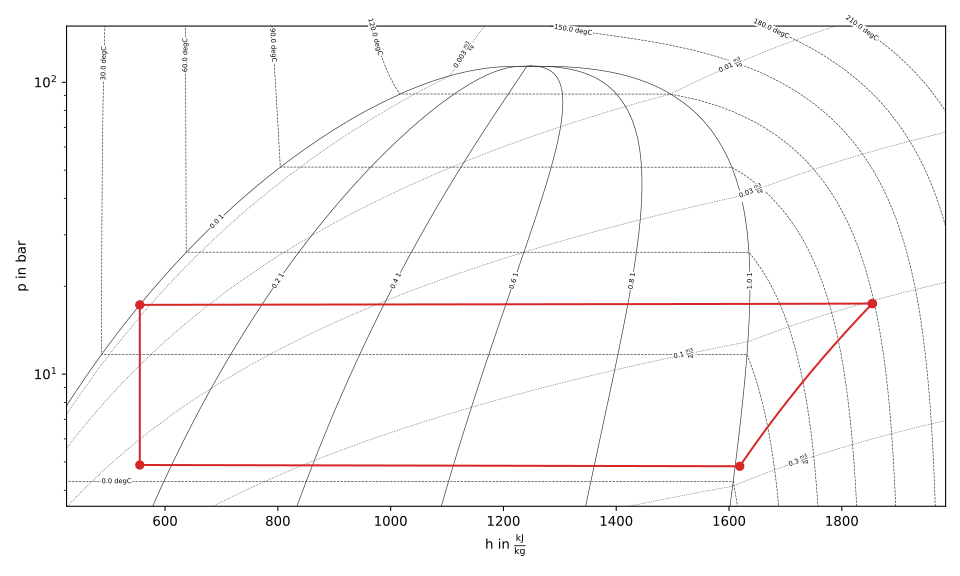
Figure: h-log(p) diagram of the NH3 GCHP.
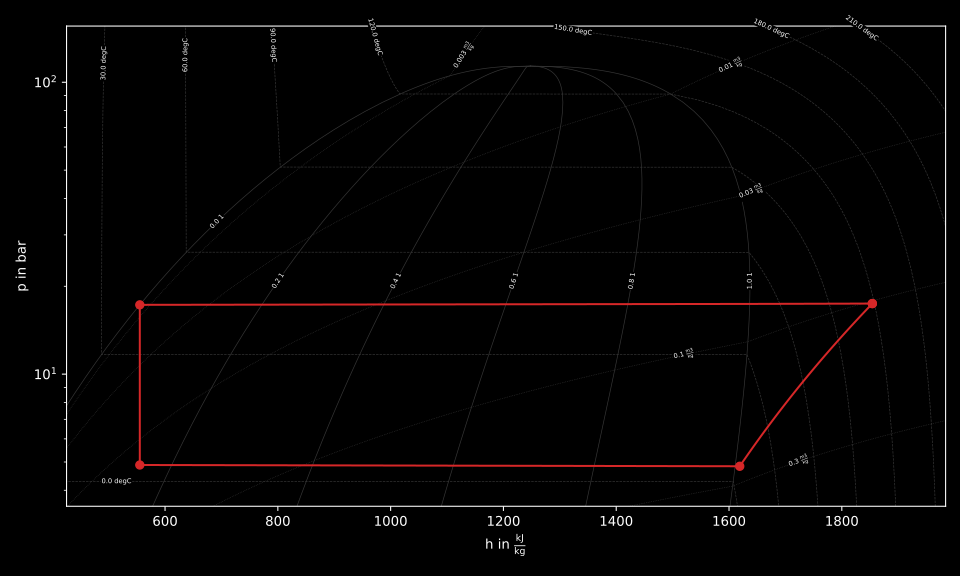
Figure: h-log(p) diagram of the NH3 GCHP.
The resulting fluid property diagram is shown in the figure above. It can easily be seen, that the evaporator slightly overheats the working fluid, while it leaves the condenser in saturated liquid state. The working fluid temperature after leaving the compressor is quite high with far more than 100 °C given the heat sink only requires a temperature of only 40 °C. In comparison, R290 leaves the compressor at a lower temperature.
More examples of creating fluid property diagrams can be found in the fluprodia documentation referenced above.
Exergy analysis
Following, the main tasks of this tutorial are presented. First, the exergy analysis is set up for the respective network and carried out for the base case. Subsequently, the influence of different parameters such as temperature of the heat source and sink as well as ambient temperature and part load operation of the heat pump regarding exergetic efficiency are investigated.
Analysis setup
After the network has been solved, the exergy analysis is carried out via the
run_exergy_analysis method, which internally creates an
exerpy.ExergyAnalysis instance from the TESPy network. All exergy
streams crossing the system boundary must be classified as:
fuel exergy
E_F- resources supplied to the systemproduct exergy
E_P- desired output of the systemexergy loss streams
E_L- exergy discarded to the environment
In exerpy, each of these is a dictionary with "inputs" and
"outputs" keys containing the labels of the boundary-crossing
connections.
For the GCHP the electrical power is supplied via a PowerConnection
labelled 'e1' (grid side). The geothermal heat boundary is represented
by the material connections 'c11' (inlet from ground) and
'c13' (outlet to ground). The heating system boundary is represented
by 'c23' (feed flow to house) and 'c21' (return flow from
house). In the example of the GCHP, only E_F and E_P are
defined. Ambient temperature and pressure are passed in the network units
(°C and bar); the method converts them to SI units (K, Pa) before calling
exerpy:
E_F = {"inputs": ["e1", "c11"], "outputs": ["c13"]}
E_P = {"inputs": ["c23"], "outputs": ["c21"]}

ean = hp.run_exergy_analysis(Tamb, pamb, E_F, E_P)
print("\n##### EXERGY ANALYSIS #####\n")
ean.exergy_results()
Results
The results can be printed and retrieved as DataFrames using the
exerpy.ExergyAnalysis.exergy_results() method:
df_comp, df_material, df_power = ean.exergy_results()
The overall system results (total E_F, E_P, E_D and
epsilon) are available directly as attributes:
print(f"E_F = {ean.E_F:.1f} W")
print(f"E_P = {ean.E_P:.1f} W")
print(f"epsilon = {ean.epsilon:.3f}")
An exergy destruction waterfall diagram can be generated with:
ean.plot_exergy_waterfall(title='NH3 Heat Pump Exergy Analysis')
Parametric analysis
Below, different parametric analyses will be presented considering the following issues:
plot exergy destruction
varying ambient and geothermal temperature
varying geothermal and heating system temperature
varying heating load and geothermal temperature
In order to be able to compare the results of the two refrigerants NH3 and
R290, all calculations are collected in a single script
all_calculations.py
that loops over both fluids. The HeatPumpModel class makes it
straightforward to switch refrigerants - only the fluid name changes. The plots
in this tutorial are created with Matplotlib in a
separate script plots.py.
For installation instructions or further documentation please see the Matplotlib
documentation.
For the post-processing, the following additional packages are required:
import numpy as np
import pandas as pd
import matplotlib.pyplot as plt
The overall structure of the calculations script is a loop over both working fluids. For each fluid the model is created, the design case is solved and saved, the h-log(p) diagram is generated and the exergy analysis is run at the design point before the parametric studies begin:
# -*- coding: utf-8 -*-
from itertools import product
import pandas as pd
import matplotlib.pyplot as plt

from heat_pump_model import HeatPumpModel

# %% ambient conditions and design parameters

pamb = 1.013  # bar
Tamb = 1.0    # °C
Tgeo = 10    # °C  (mean geothermal temperature)

# %% set up model and run design calculation
for fluid in ["NH3", "R290"]:

    hp = HeatPumpModel(fluid, Tamb=Tamb, pamb=pamb, Tgeo=Tgeo)
    hp.nw.print_results()
    hp.save_design()

    # %% log(p)-h diagram

    fig, ax = hp.plot_logph_diagram_matplotlib("c1")
    plt.tight_layout()
    fig.savefig(f"{fluid}_logph.svg")
    plt.close()

    # %% exergy analysis at design point

    E_F = {"inputs": ["e1", "c11"], "outputs": ["c13"]}
    E_P = {"inputs": ["c23"], "outputs": ["c21"]}
    exergy_kwargs = {"Tamb": Tamb, "pamb": pamb, "E_F": E_F, "E_P": E_P}
    run_exergy = lambda model: model.run_exergy_analysis(**exergy_kwargs)

    ean = hp.run_exergy_analysis(**exergy_kwargs)
    print("\n##### EXERGY ANALYSIS #####\n")
    ean.exergy_results()

    ean.plot_exergy_waterfall(title=f"{fluid} Heat Pump Exergy Analysis", show_plot=False)
    plt.tight_layout()
    plt.savefig(f"{fluid}_waterfall.svg")
    plt.close()
Note
All code excerpts shown in the following subsections are continuations
of the same for fluid in ["NH3", "R290"]: loop introduced
above. They are not standalone scripts.
Plot exergy destruction
In order to visualize how much exergy of the fuel exergy E_F the
individual components of the GCHP destroy, the exergy destruction E_D
can be displayed in a bar chart as shown at the end of this section. The
waterfall diagram is created directly from the ExergyAnalysis instance
by calling exerpy.ExergyAnalysis.plot_exergy_waterfall().
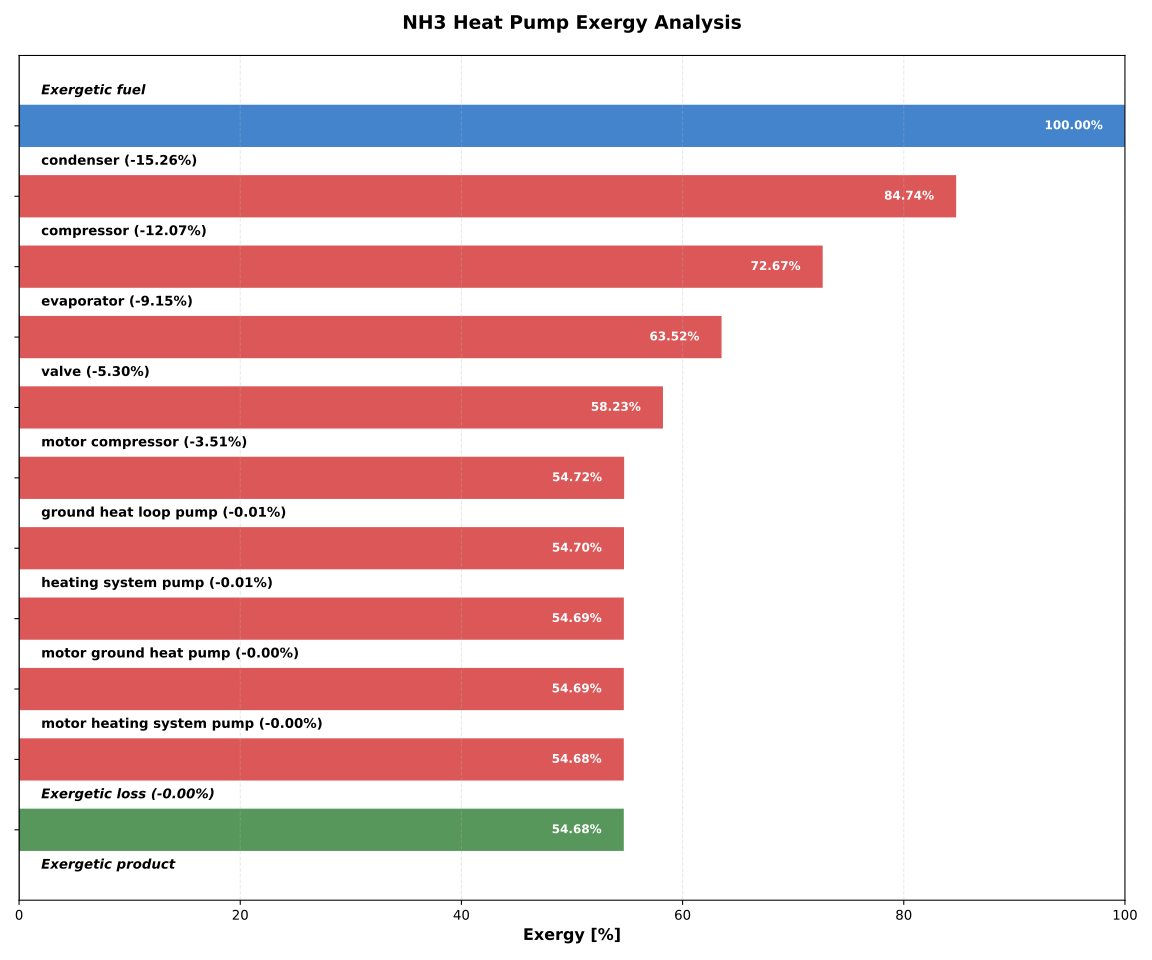
Figure: Waterfall diagram for the ammonia heat pump
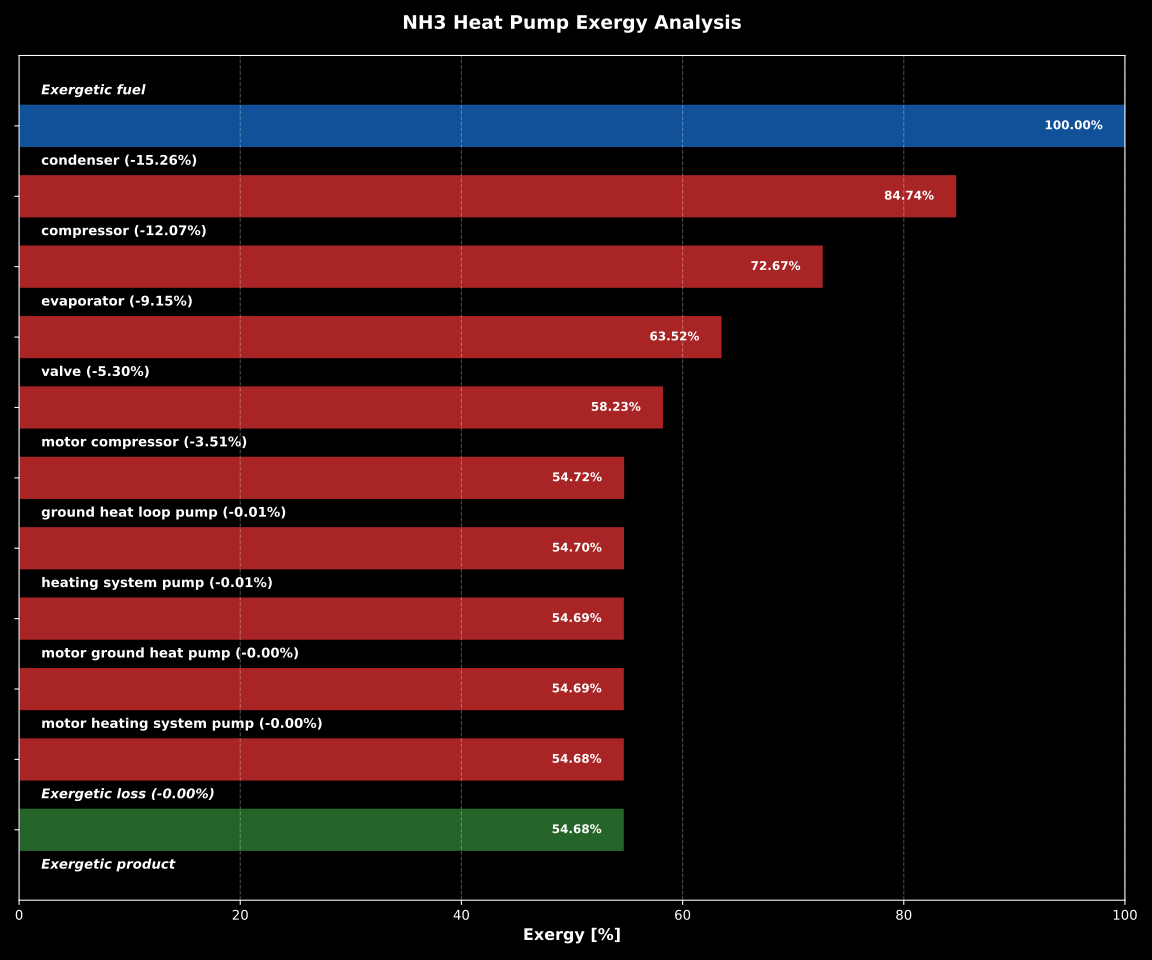
Figure: Waterfall diagram for the ammonia heat pump
In addition, the component-level results are exported to a .csv file
so that they can be combined across refrigerants in the separate plot script.
The code below extracts E_D and the running fuel-exergy remainder for
each component that destroys more than 1 W, and saves a compact DataFrame:
    df_comp, _, _ = ean.exergy_results(print_results=False)
    df_comp = df_comp[(df_comp["Component"] != "TOT") & df_comp["E_F [kW]"].notna()].copy()

    comps = ["E_F"]
    E_D_list = [0]
    running = ean.E_F          # W
    E_P_list = [running]

    for _, row in df_comp.iterrows():
        e_d = row["E_D [kW]"] * 1e3   # W
        if e_d > 1:
            comps.append(row["Component"])
            E_D_list.append(e_d)
            running -= e_d
            E_P_list.append(running)

    comps.append("E_P")
    E_D_list.append(0)
    E_P_list.append(running)

    pd.DataFrame([E_D_list, E_P_list], columns=comps, index=["E_D", "E_P"]).to_csv(f"{fluid}_E_D.csv")
Note
In order to be able to use the data from the data frames in a separate script for plot creation, all data frames must be saved as a file with their own individual name.
In the separate plot script
(plots.py) the
.csv files can now be re-imported to create plots with Matplotlib. The
Python code for creating the bar chart is included in the previously
referenced plot script and can be found there. For more information on
creating plots with Matplotlib, please check the
Matplotlib documentation. The resulting bar chart
is shown below.
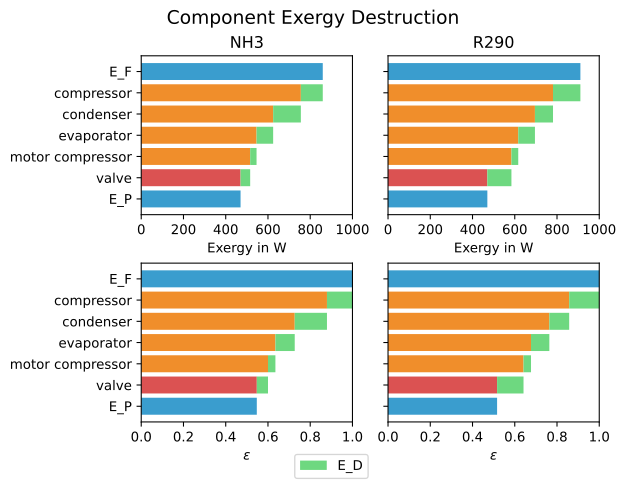
Figure: Comparison of exergy destruction and exergy efficiency of both working fluids in design case.
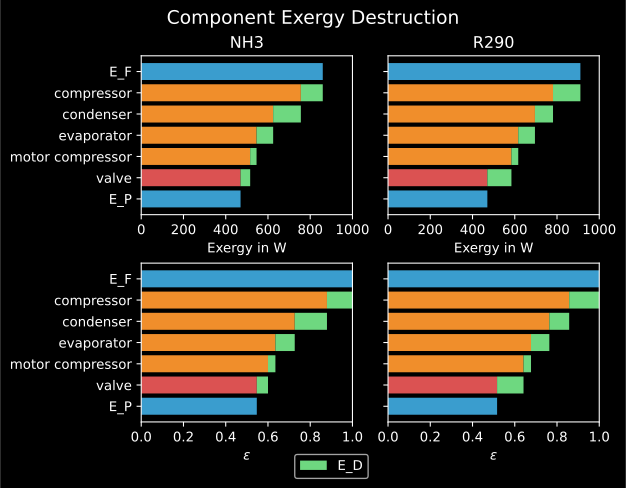
Figure: Comparison of exergy destruction and exergy efficiency of both working fluids in design case.
The bar chart shows how much exergy the individual components of the GCHP
destroy in absolute terms and as a percentage of the fuel exergy E_F.
After deducting the destroyed exergy E_D, the product exergy
E_P remains. Overall, it is noticeable that the GCHP with NH3 requires
less fuel exergy than the GCHP with R290, with the same amount of product
exergy. Furthermore, with NH3 the condenser has the highest exergy destruction,
whereas with R290 the valve destroys the largest amount of exergy.
Varying ambient and geothermal temperature
In order to consider the influence of a change in ambient temperature or geothermal temperature on the exergetic efficiency, parametric studies are performed with different values of these parameters.
For the variation of the ambient temperature Tamb, only the exergy
analysis is re-executed without re-solving the network - the thermodynamic
state is unchanged and only the reference temperature shifts. The ambient
temperature is varied between 4°C and 20°C.
The mean geothermal temperature Tgeo is varied between 14°C and 8°C
via offdesign calculations using the
sensitivity_analysis() method.
The method accepts a param_dict with the parameter name and a list of
values, a list of result quantities to collect and the solve mode. When a
postproc_func is provided, it is called after each successful solve -
here it runs the exergy analysis so that epsilon is up to date before
the results are recorded.
    hp.nw.iterinfo = False

    Tamb_design = Tamb
    Tgeo_design = Tgeo

    # --- varying ambient temperature (exergy only, no re-solve) ---

    Tamb_range = [4, 8, 12, 16, 20]
    eps_Tamb = [
        hp.run_exergy_analysis(T, pamb, E_F, E_P).epsilon
        for T in Tamb_range
    ]
    pd.DataFrame([eps_Tamb], columns=Tamb_range, index=[Tgeo_design]).to_csv(f"{fluid}_eps_Tamb.csv")

    # --- varying mean geothermal temperature (offdesign) ---

    Tgeo_range = [14, 13, 12, 11, 10, 9, 8]
    results_Tgeo = hp.sensitivity_analysis(
        param_dict={
            "T_geo":  [T for T in Tgeo_range]
        },
        result_param_list=["epsilon"],
        mode="offdesign",
        postproc_func=run_exergy,
    )
    pd.DataFrame(
        [results_Tgeo["epsilon"].values],
        columns=Tgeo_range, index=[Tamb_design],
    ).to_csv(f"{fluid}_eps_Tgeo.csv")

    # reset geo temperatures to design values
    hp.set_parameters(T_geo=Tgeo_design)
The results of the calculation can be plotted as shown in the following
figure. The related Python code to create this plot can be found in the plot
script (plots.py). For
further documentation please see the Matplotlib
documentation.
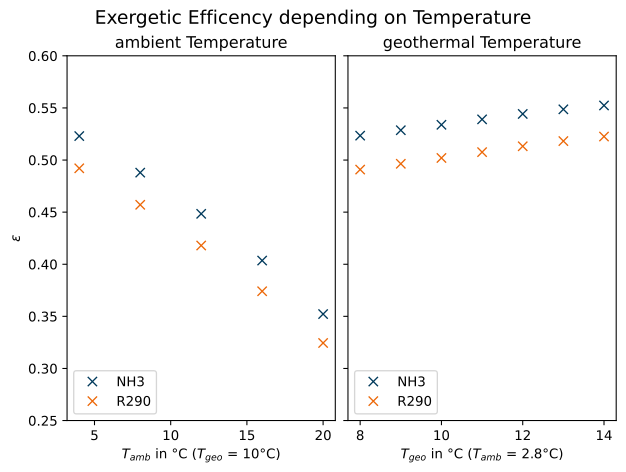
Figure: Varying ambient and geothermal temperature.
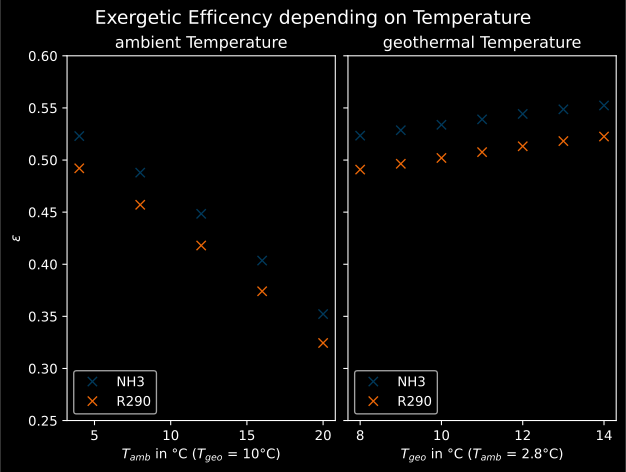
Figure: Varying ambient and geothermal temperature.
It can be recognized that the specified ambient temperature Tamb used
in the exergy analysis has a considerable influence on the exergetic efficiency
epsilon. The closer the ambient temperature is to the temperature of the
heating system, the lower the exergetic efficiency. This can be argued from
the fact that while E_F and E_P both decrease with increasing
Tamb, E_P decreases proportionally more than E_F. In
comparison, it can be seen on the right that with increasing Tgeo, and
thus decreasing temperature difference between geothermal heat collector and
heating system, epsilon increases. This can be explained by the resulting
decrease in E_F with E_P remaining constant.
Varying geothermal and heating system temperature
Another relation that can be investigated is the influence of a change in the
geothermal and the heating system temperatures on the exergetic efficiency and
the COP of the GCHP. In this calculation Tgeo is varied between 14°C
and 10°C. The heating system temperature Ths is varied between 45°C
and 35°C. All temperature values are mean values of the feed and return flow
temperatures.
The full Cartesian product of Tgeo_range and Ths_range is
assembled with itertools.product() and passed to
sensitivity_analysis() as
parallel lists. Both T_geo and T_hs are varied simultaneously
within a single offdesign loop, and the results DataFrame is then pivoted to
obtain COP and exergetic efficiency as functions of both temperatures:
    Tgeo_range = [14, 12, 10]
    Ths_range = [45, 40, 35]

    T_geo_list = []
    T_hs_list = []

    for tgeo, ths in product(Tgeo_range, Ths_range):
        T_geo_list.append(tgeo)
        T_hs_list.append(ths)

    result = {
        "T_geo": T_geo_list,
        "T_hs": T_hs_list
    }

    results = hp.sensitivity_analysis(
        param_dict=result,
        result_param_list=["COP", "epsilon"],
        mode="offdesign",
        postproc_func=run_exergy,
    )

    results.pivot(index="T_geo", columns="T_hs", values="COP").to_csv(f"{fluid}_cop_Tgeo_Ths.csv")
    results.pivot(index="T_geo", columns="T_hs", values="epsilon").to_csv(f"{fluid}_eps_Tgeo_Ths.csv")

    # reset heating system temperatures to design values
    hp.set_parameters(T_hs=40)
The results of this calculation are shown in the following figure. The
corresponding Python code can likewise be found in the plot script
(plots.py).
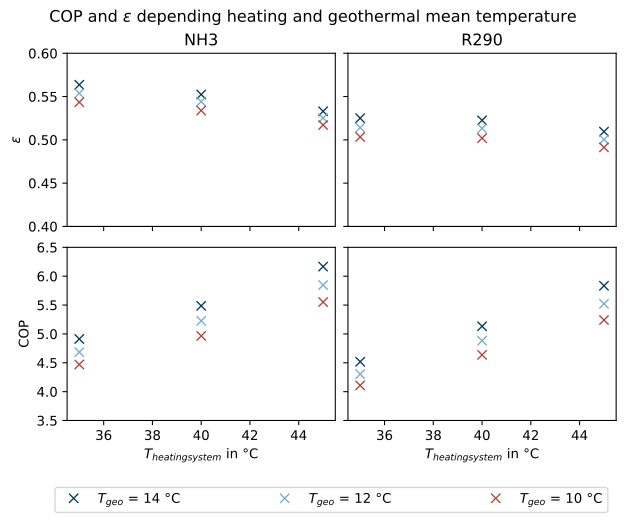
Figure: Varying geothermal and heating system temperature.
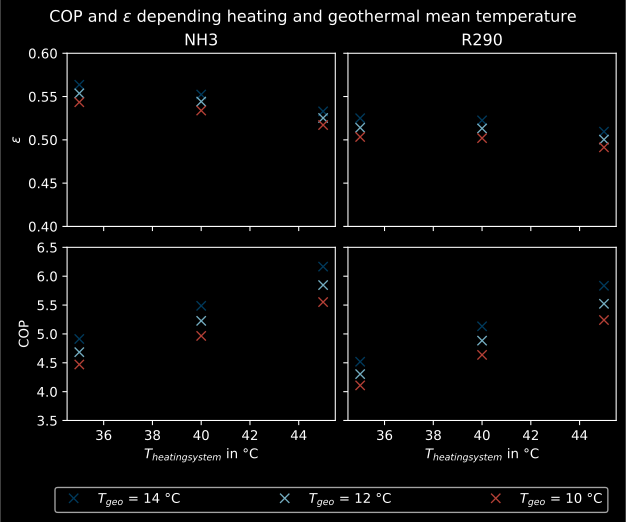
Figure: Varying geothermal and heating system temperature.
It can be seen that the GCHP with NH3 has a better exergetic efficiency than
with R290. As in the prior investigation, an increasing geothermal heat
collector temperature also has a favorable effect on epsilon. The opposite
behavior of epsilon and COP for both refrigerants is remarkable. The COP drops
while the exergetic efficiency rises. This can be explained by the fact that at
constant heating load Q, the required electrical power input increases
as the heating system temperature rises. However regarding exergetic
efficiency, E_F and E_P both increase with increasing heating
system temperature. The ratio between these two parameters is such that
the exergetic efficiency improves as the heating system temperature rises.
Varying geothermal temperature and heating load
Finally, the influence of the simultaneous variation of the geothermal
temperature Tgeo and the heating load Q on the exergetic
efficiency and the COP of the GCHP is examined. The investigation is carried
out in the same way as the variation of Tgeo and Ths described
above. In contrast to the previous investigation, Q is varied here
instead of Ths. The range of Q varies between 4.3 and 2.8 kW.
The rated load was previously set at 4 kW in the design calculation.
    Q_range = [4.3e3, 4e3, 3.7e3, 3.4e3, 3.1e3, 2.8e3]

    T_geo_list = []
    Q_list = []

    for tgeo, q in product(Tgeo_range, Q_range):
        T_geo_list.append(tgeo)
        Q_list.append(-q)

    result = {
        "T_geo": T_geo_list,
        "Q": Q_list
    }

    results = hp.sensitivity_analysis(
        param_dict=result,
        result_param_list=["COP", "epsilon"],
        mode="offdesign",
        postproc_func=run_exergy,
    )

    results.pivot(index="T_geo", columns="Q", values="COP").to_csv(f"{fluid}_cop_Tgeo_Q.csv")
    results.pivot(index="T_geo", columns="Q", values="epsilon").to_csv(f"{fluid}_eps_Tgeo_Q.csv")
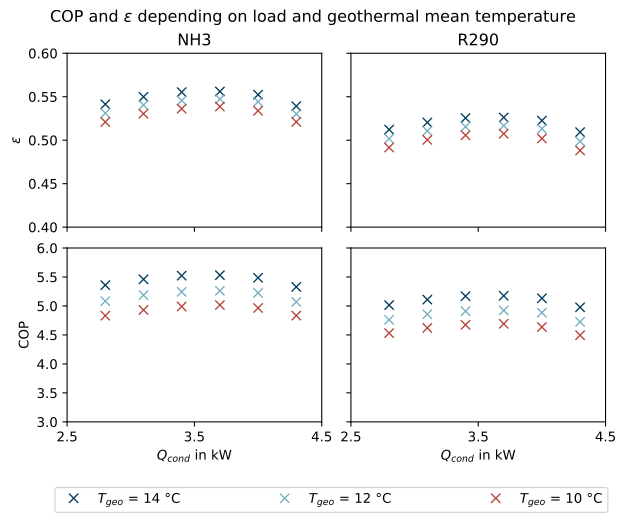
Figure: Varying geothermal temperature and heat load.
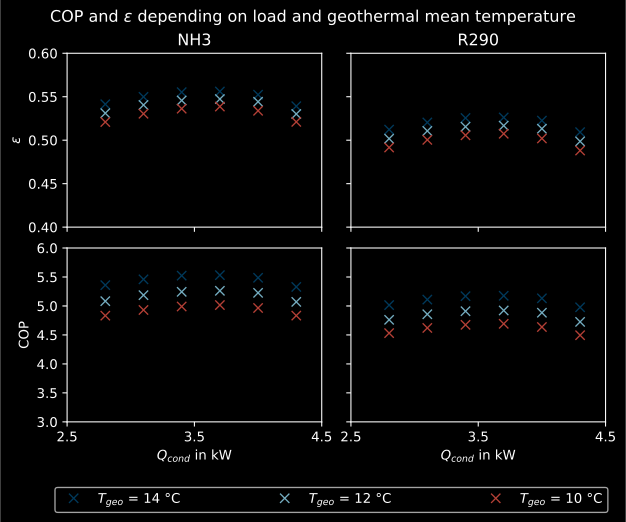
Figure: Varying geothermal temperature and heat load.
The results are shown in the figure above. As before, the Python code for
creating the plot can be found in the plot script
(plots.py).
The partial load behavior of the GCHP, which results from the characteristic
lines of the efficiencies of the individual components, can be recognized
in the curves shown.
Conclusion
This tutorial provides an exemplary insight into post-processing with the TESPy exergy analysis tool. Of course, other parameters can also be examined and varied. Feel free to try out different parameter variations. But make sure that the data ranges are not only adjusted in the Python script of the model, but also in the Python script of the plots, if a plot is created with the stand-alone plot script.
More examples of exergy analysis can be found in the TESPy analysis section and in the exerpy documentation. If you are interested in contributing or have questions and remarks on this tutorial, you are welcome to file an issue at our GitHub page.